Tracks v0.2.0: Phase 0 Complete - Foundation Ready for Production

I'm excited to announce Tracks v0.2.0, marking the completion of Phase 0 (Foundation). The CLI tool can now generate production-ready Go web applications with clean architecture, comprehensive tooling, and multi-database support.
Status: Phase 0 - Foundation ✅ Complete
Available Now:
- ✅ Complete
tracks newcommand with project scaffolding - ✅ Multi-database driver support (LibSQL, SQLite3, PostgreSQL)
- ✅ Development tooling (Makefile, Air, Docker Compose, golangci-lint, Mockery, CI/CD)
- ✅ Auto-generated
.envand automatic Docker service startup - ✅ Production-ready templates with health endpoints, logging, and configuration
- ✅ Comprehensive documentation with tutorials and guides
Try It:
# Install (requires Go 1.25+)
go install github.com/anomalousventures/tracks/cmd/tracks@v0.2.0

# Create a new project
tracks new myapp
cd myapp

# Start development (auto-starts Docker, runs with live reload)
make dev
Phase 0: Mission Accomplished
Phase 0 (Foundation) set out to build the CLI infrastructure and project generation capabilities that would serve as the foundation for all future features. With v0.2.0, all five epics are complete:
- ✅ CLI Infrastructure - Cobra framework, Renderer pattern, mode detection
- ✅ Template Engine - Embedded template system with variable substitution
- ✅ Project Generation - Complete
tracks newcommand - ✅ Generated Project Tooling - Makefile, Docker, CI/CD, testing, linting
- ✅ Documentation - Installation guides, tutorials, architecture docs, CLI reference
This milestone means Tracks can now generate real, working Go applications that you can run, test, and deploy today.
What's Working
Project Generation (tracks new)
The star of this release is the tracks new command, which generates a complete Go web application with clean architecture and production-ready tooling.
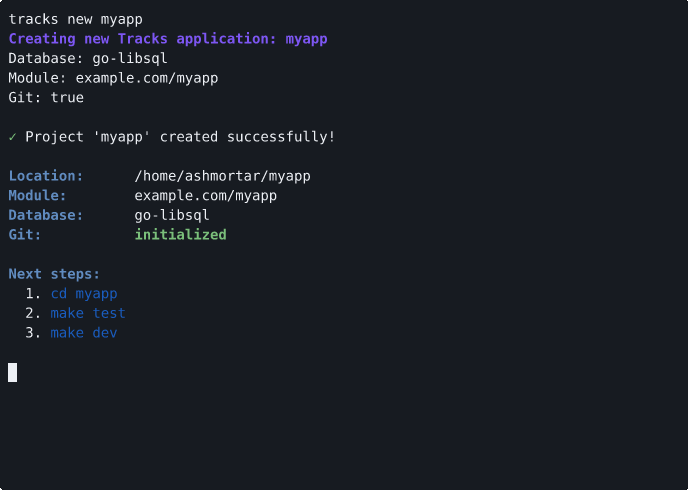
What you get:
tracks new myapp
# Choose database driver: LibSQL (default), SQLite3, or PostgreSQL
# Generates complete project structure with:
# - Clean layered architecture (handlers → services → repositories)
# - Health check endpoint with database connectivity test
# - Auto-generated .env with sensible defaults
# - Makefile with dev, test, lint, build targets
# - Docker Compose for local development
# - GitHub Actions CI workflow
# - All tests passing out of the box
You can customize the generated project with flags:
# Specify database driver
tracks new myapp --db postgres

# Provide custom module path
tracks new myapp --module github.com/myorg/myapp

# Skip git initialization
tracks new myapp --no-git
See the CLI documentation for all available options.
Development Tooling
Generated projects include a comprehensive development environment that just works:
Makefile targets:
make dev       # Auto-starts Docker services, runs with Air live reload
make test      # Runs all tests
make lint      # Runs golangci-lint for code quality
make build     # Builds production binary
make generate  # Generates test mocks and SQL code
Docker Compose integration:
- Automatic service startup with
make dev - Database containers for all supported drivers (Postgres, LibSQL, SQLite)
- Health checks and proper networking
- No manual configuration required
Live reload with Air:
- Watches for code changes
- Automatically rebuilds and restarts
- Fast feedback loop during development
CI/CD ready:
- GitHub Actions workflow included
- Tests run on Ubuntu, macOS, and Windows
- Linting enforced in CI
- Mock generation verified
Production-Ready Architecture
Generated applications follow clean architecture principles and include everything you need for production:
Health check endpoint:
curl http://localhost:8080/api/health
# Returns JSON with status and timestamp
Structured logging:
- zerolog for high-performance JSON logging
- Configurable log levels via environment variables
- Request logging middleware included
Configuration management:
- Hierarchical config (defaults → .env → env vars)
- Type-safe configuration with Viper
- Environment-specific settings
Type-safe database queries:
- SQLC integration generates Go code from SQL
- Compile-time query validation
- Support for LibSQL, SQLite3, and PostgreSQL
Documentation
This release includes comprehensive documentation to help you get started:
- Getting Started Guide - Installation and setup
- Quickstart Tutorial - Create your first project in 15 minutes
- CLI Reference - Complete command documentation
- Architecture Overview - Understand the generated project structure
All documentation is available at go-tracks.io.
What's Next
With Phase 0 complete, development moves to Phase 1 (Core Web Layer):
- Code generators for resources, handlers, services, and repositories
- Interactive TUI for guided project setup with Bubble Tea
- Additional scaffolding commands for common patterns
See the full roadmap for details on all planned phases.
Installation
Homebrew (macOS/Linux)
brew install anomalousventures/tap/tracks
Go Install
go install github.com/anomalousventures/tracks/cmd/tracks@v0.2.0
Docker
docker pull ghcr.io/anomalousventures/tracks:0.2.0
docker run ghcr.io/anomalousventures/tracks:0.2.0 version
Scoop (Windows)
scoop bucket add anomalousventures https://github.com/anomalousventures/scoop-bucket
scoop install tracks
Direct Download
Download pre-built binaries from the v0.2.0 release page.
Available for:
- Linux (AMD64, ARM64) -
.tar.gz,.deb,.rpm,.apk - macOS (AMD64, ARM64) -
.tar.gz - Windows (AMD64, ARM64) -
.zip
Contributing
Tracks is in active early development and contributions are welcome!
Ways to contribute:
- Report bugs and request features via GitHub Issues
- Discuss ideas in GitHub Discussions
- Submit pull requests (see CONTRIBUTING.md)
Acknowledgments
Tracks builds on excellent open-source projects:
- Cobra - CLI framework
- Chi - HTTP routing
- templ - Type-safe templates
- SQLC - SQL code generation
- Goose - Database migrations
- Air - Live reload
- golangci-lint - Linting
- Mockery - Mock generation
- Bubble Tea - TUI framework
Thank you to all the maintainers and contributors of these projects.
Ready to build? Install Tracks and create your first project today. Join the GitHub Discussions to share what you're building and help shape the future of the project.
An Anomalous Venture by Aaron Ross